 Benelog Tech Notes
- 1. Floating-Point Errors in Code
- 2. Bit Layout of double (IEEE 754 binary64) and How 0.1 Is Stored
- 3. Failures Caused by Binary Representation Errors
- 4. Alternatives in Java for Avoiding Decimal Arithmetic Errors
- 5. Choosing Between BigDecimal and Integer Calculation
- 6. Domain-Specific Libraries for Money and Units
- 7. References
Java’s double and float types store values in binary according to the IEEE 754 floating-point standard.
In this format, the decimal number 0.1 cannot be represented exactly.
In binary, 0.1 is an infinitely repeating fraction, so fitting it into a finite number of bits requires rounding it to the nearest representable value.
This article explains why such errors occur and when they become dangerous, using real failures as examples, and then summarizes the alternatives available in Java.
1. Floating-Point Errors in Code
You can see floating-point errors quickly in jshell, the interactive tool included with the JDK since JDK 9.
jshell> 0.1 + 0.2
$1 ==> 0.30000000000000004

jshell> 0.1 + 0.2 == 0.3
$2 ==> false

jshell> 1.03 - 0.42
$3 ==> 0.6100000000000001
Adding 0.1 ten times does not give 1.0.
jshell> double sum = 0;
sum ==> 0.0

jshell> for (int i = 0; i < 10; i++) { sum += 0.1; }

jshell> sum
sum ==> 0.9999999999999999
The BigDecimal constructor reveals the value actually stored for the double literal 0.1.
jshell> new BigDecimal(0.1)
$1 ==> 0.1000000000000000055511151231257827021181583404541015625
I typed 0.1 at the jshell prompt, but the stored value is greater than 0.1 by about 5.55 × 10⁻¹⁸.
This error is not specific to Java.
JavaScript’s number type also uses the IEEE 754 binary64 format, so entering the same expressions in the Chrome DevTools console gives the same results.
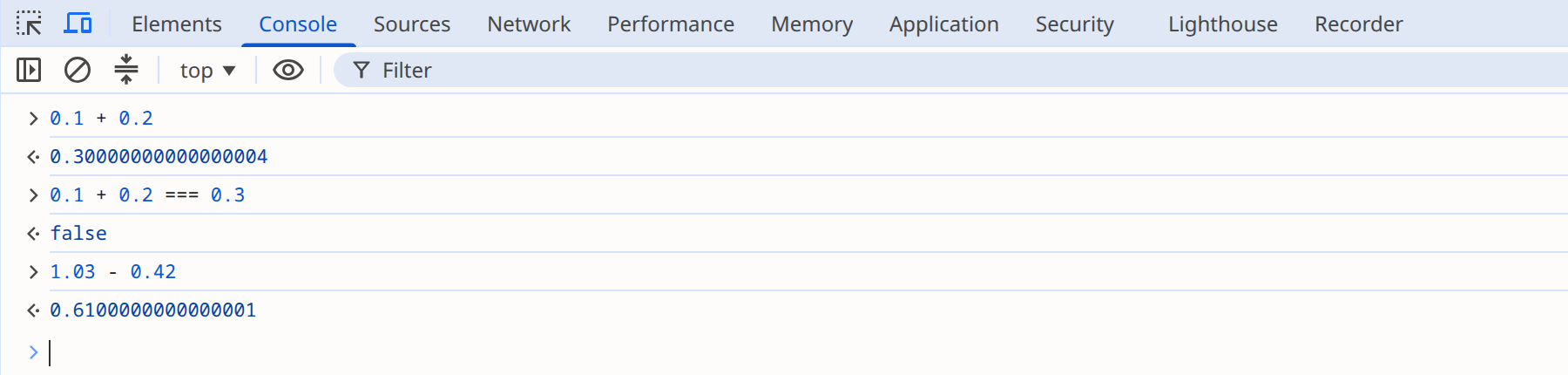
The next section follows the bit layout of double to show why these values are stored.
2. Bit Layout of double (IEEE 754 binary64) and How 0.1 Is Stored
IEEE 754 is a standard that defines several floating-point formats. Java uses two of them.
| Format | 1985 name | Size | Java type |
|---|---|---|---|
binary32 |
single |
32 bits (sign 1 / exponent 8 / fraction 23) |
|
binary64 |
double |
64 bits (sign 1 / exponent 11 / fraction 52) |
|
The first version of the standard, IEEE 754-1985, called these two formats single and double. The 2008 revision renamed them binary32 and binary64, and these names carry over to the current standard, IEEE 754-2019. The standard also defines binary16, binary128, and the decimal formats decimal32, decimal64, and decimal128.
The binary formats of IEEE 754 convert a real number to binary scientific notation and then store it as bits. In decimal scientific notation, you shift the decimal point so that the integer part is a single digit from 1 to 9, and express the number of places shifted as a power of 10. For example, 0.001 is written as 1.0 × 10⁻³. Binary works the same way: you multiply or divide by 2 until the integer part is a single digit, that is, until the value is at least 1 and less than 2. The only nonzero digit in binary is 1, so the normalized result always takes the form ±1.fraction × 2exponent. For example, binary 0.011 (decimal 0.375) is written as 1.1 × 2-2.
A double (binary64) stores this normalized value in 64 bits according to the following rules.
-
The sign (s) is stored in the first bit. 0 means positive and 1 means negative.
-
The exponent (e) is stored in 11 bits as the actual exponent plus 1023. This lets exponents from -1022 to 1023 be stored as unsigned integers from 1 to 2046; reading the value subtracts 1023 again. Of the values 0 to 2047 that 11 bits can hold, the two at either end are reserved: 0 represents zero and numbers very close to zero, and 2047 represents infinity and NaN.
-
The fraction (f) stores only the part after the binary point of 1.fraction, in 52 bits. The integer part of a normalized number is always 1, so that 1 is omitted.
-
If the part after the binary point exceeds 52 bits, it is rounded to the nearest value.
The figure below shows 0.1 stored according to these rules. The 64 bits are divided into a 1-bit sign, an 11-bit exponent, and a 52-bit fraction.
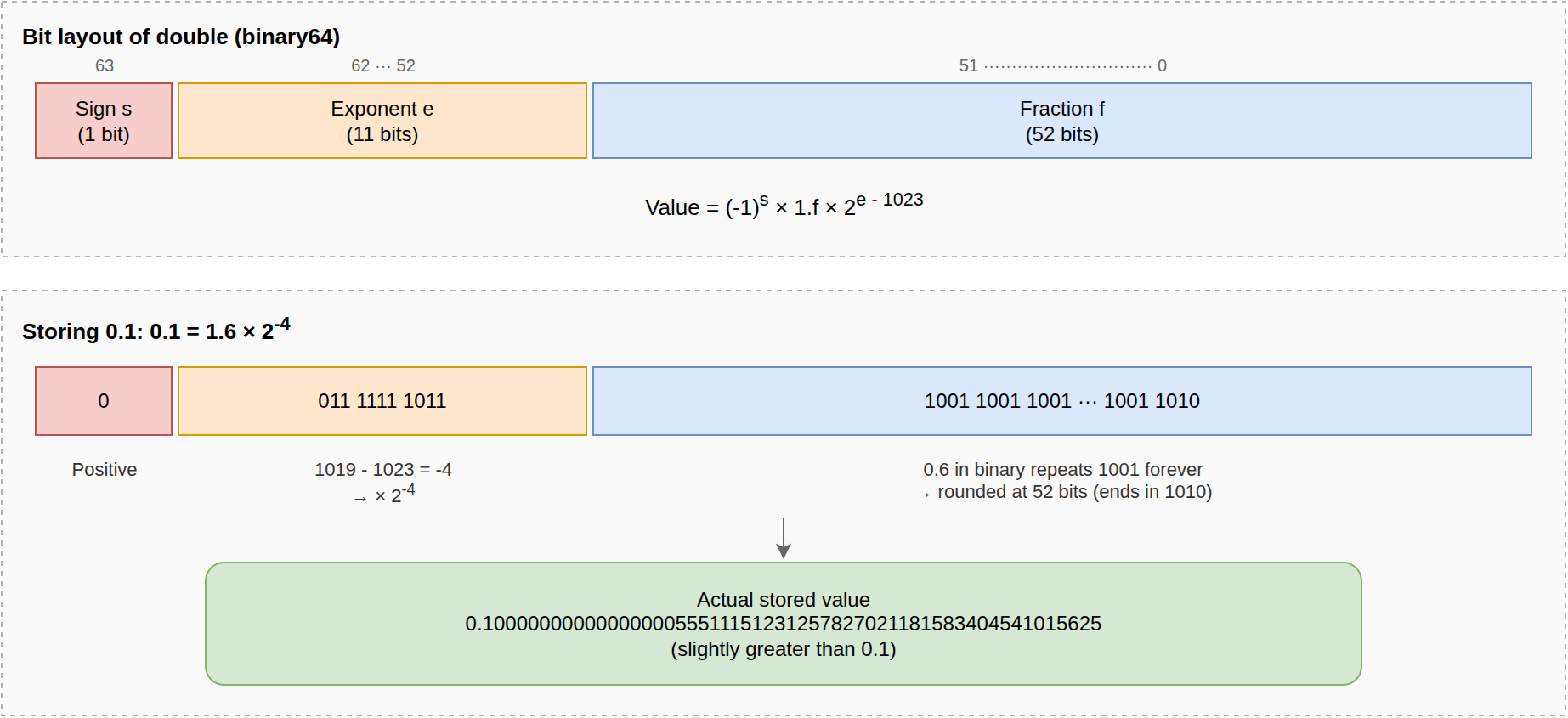
Let’s follow the conversion in the lower half of the figure.
Multiplying 0.1 by 2 repeatedly gives 0.2, 0.4, and 0.8, and on the fourth step it becomes 1.6, which is the first value at least 1 and less than 2.
Since multiplying by 2 four times gave 1.6, 0.1 = 1.6 ÷ 24 = 1.6 × 2-4.
The sign bit is therefore 0, and the exponent field is -4 + 1023 = 1019.
The fraction is the problem.
Converting 0.6 to binary gives 0.1001 1001 1001…, with 1001 repeating forever.
Fitting it into 52 bits requires rounding.
The bits following the first 52 are 1001…, so the discarded part is more than half of the last bit’s weight.
The value is therefore rounded up, and the last four bits of the fraction change from 1001 to 1010.
As a result, what gets stored is not 0.1 but a number very slightly greater than 0.1.
The value 0.1000000000000000055511151231257827021181583404541015625 seen earlier with new BigDecimal(0.1) is exactly this rounded value.
You can see the stored bits in hexadecimal in jshell.
jshell> Long.toHexString(Double.doubleToLongBits(0.1))
$1 ==> "3fb999999999999a"
One hexadecimal digit is 4 bits. The first three digits, 3fb, are the 12 bits of the 1-bit sign and the 11-bit exponent combined: the sign bit is 0 and the exponent field is 0x3fb, or 1019 in decimal. The remaining thirteen digits are the 52-bit fraction. The digit 9 (1001) repeats twelve times, and only the last digit is rounded up to a (1010).
Not every decimal fraction has this error. Fractions whose denominator is a power of 2, such as 0.5 (1/2), 0.25 (1/4), and 0.75 (3/4), are finite binary fractions, so they are stored exactly as long as they need no more than 53 significant bits. In contrast, a decimal fraction whose reduced denominator contains a factor of 5, such as 0.1 = 1/10, becomes an infinitely repeating binary fraction and cannot avoid rounding error. For more detail on the standard, see the Wikipedia article on IEEE 754.
3. Failures Caused by Binary Representation Errors
In fields that deal with approximations, such as data from scientific experiments, these errors often fall within an acceptable range. But where values must be exactly equal, such as money and grades, or where errors accumulate across calculations, even a tiny error becomes a critical bug. Let’s look at two cases, one in Korea and one abroad, where such errors led to real failures.
3.1. The 2011 NEIS Grading Error
In July 2011, a grade-processing error in NEIS, the next-generation National Education Information System of South Korea, changed the end-of-semester class ranks of about 29,000 students at 823 high schools nationwide. It happened just before the early-admission season for universities, so the impact was large.
NEIS computed a semester total by adding written exam scores and performance assessment scores. The ranks of students with the same total were decided by a tie-breaking rule that each school chose from 45 options (Yeongnam Ilbo article, in Korean). For example, at a school that gives priority to written exam scores, student A with 65 on the written exam and 25 on performance assessments ranks ahead of student B with 60 and 30, even though both have a total of 90. Detecting ties is an important step in computing ranks; schools even had to choose a tie-breaking rule in advance.
NEIS was programmed to display totals to 16 decimal places, and some values had a stray '1' appearing irregularly in those decimal places. This is the same pattern as 1.03 - 0.42 producing 0.6100000000000001 at the beginning of this article. For example, if two students' totals are computed as 90 and 90.00000000000001, the values are not equal, so a direct comparison treats the two students as not tied and sorts the one with the error as having a higher score. As a result, students who should have had the same total were not detected as tied, or the ranks among tied students were reversed (notice from the Ulsan Metropolitan Office of Education, in Korean). The Ministry of Education, Science and Technology explained that the bug was caused by not correcting this calculation error (Kyunghyang Shinmun article, in Korean).
jshell shows that adding the same numbers in a different order can produce a different sum. The following is not NEIS’s actual formula, only an illustration of the principle.
jshell> 0.1 + 0.2 + 0.3
$1 ==> 0.6000000000000001

jshell> 0.3 + 0.2 + 0.1
$2 ==> 0.6

jshell> (0.1 + 0.2 + 0.3) == (0.3 + 0.2 + 0.1)
$3 ==> false
Both sums add the same three numbers and should be equal, but with double they produce different values and are not detected as a tie.
According to the Ministry’s count, the ranks of 29,007 students at 823 high schools changed, and for 2,416 students at 350 of those schools, the rank grade changed as well (Jeju Ilbo article, in Korean). Schools had to recompute grades with an error-correction program and reissue report cards (Kyunghyang Shinmun article).
The results of an inspection the Ministry’s special task force announced in September of the same year identify the type in which the error occurred.
According to the report, while the old NEIS programs were being redeveloped for the next-generation NEIS, the team failed to anticipate arithmetic errors with floating-point (Double) data that arise from the characteristics of the newly installed database (DB2), and this caused the grading errors (Electronic Times article, in Korean).
In other words, grades were computed with the DB2 DOUBLE type.
The DOUBLE type in Db2 for Linux, UNIX, and Windows is 64 bits with the same range as IEEE 754 binary64, so it has the same kind of error as Java’s double.
Some programs were missing the 'error correction code' that was supposed to fix that error, and the ranks were reversed in those programs (Yonhap News article, in Korean).
At the time, network developer Lee Kyung-moon pointed out in a DailySecu article (in Korean) that the problem was using floating point where exact numeric representation was required.
He argued that rather than correcting the error, the design should have switched to integer processing or a type that supports arbitrary precision.
Integer minor units and BigDecimal, introduced later in this article, are exactly those two options.
The incident shows that handling values with decimal arithmetic, such as grades, in floating point can break comparisons such as tie detection.
3.2. The 1991 Gulf War Patriot Missile Failure
The fact that 0.1 cannot be represented as a finite binary fraction has also cost lives. On February 25, 1991, during the Gulf War, an Iraqi Scud missile struck a US Army barracks in Dhahran, Saudi Arabia, killing 28 American soldiers and injuring 99 (US Army article). A Patriot missile battery was deployed at the base to intercept such attacks, but it did not even attempt an interception.
Chapter 1 of the Korean book Software Errors in History (Acorn Publishing, 2014), titled "28 Lives Taken by an Error of 0.000000095," explains the cause of the incident based on the US GAO’s investigation report. The Patriot system counted time in tenths of a second to predict where a target would appear, and converted the count to seconds by multiplying it by 0.1 stored in a 24-bit fixed-point register. Because 0.1 is an infinitely repeating binary fraction, everything beyond 24 bits was truncated, and an error of about 0.000000095 seconds accumulated every tenth of a second. After 20 hours of continuous operation, the computed time was 0.0687 seconds behind the actual time; after about 100 hours, as with the battery at the time of the incident, it was 0.3433 seconds behind. By the GAO report’s calculation, this timing error shifted the range gate where the system looked for the target by 687 meters. The tracking radar searched an area that far from the missile’s actual position. The radar found no target there, so no interceptor was launched, and the Scud hit the barracks.
This system used fixed-point arithmetic, not floating point like double.
But the principle is the same as in this article: 0.1 could not fit into a finite number of binary digits, and the error accumulated.
4. Alternatives in Java for Avoiding Decimal Arithmetic Errors
This section introduces two ways to avoid the errors of double arithmetic: using BigDecimal, and handling amounts as integers in the smallest unit.
4.1. Calculating with BigDecimal
The standard way to handle decimal fractions exactly in Java is java.math.BigDecimal.
Why You Should Never Use Float and Double for Monetary Calculations also recommends BigDecimal instead of floating-point types for monetary calculations.
jshell> new BigDecimal("0.1").add(new BigDecimal("0.2"))
$1 ==> 0.3

jshell> new BigDecimal("1.03").subtract(new BigDecimal("0.42"))
$2 ==> 0.61
There is one catch. If you pass a double to the constructor, the rounding error introduced when the decimal fraction was stored in the double carries over into the BigDecimal.
As shown earlier, new BigDecimal(0.1) holds the approximation stored in the double, not 0.1.
To avoid this error, use the constructor that takes a string, or BigDecimal.valueOf().
BigDecimal.valueOf(0.1) builds the value from the string "0.1" returned by Double.toString(0.1), so it is 0.1.
However, valueOf() cannot remove an error that already exists in a value computed as a double.
BigDecimal.valueOf(0.1 + 0.2) is 0.30000000000000004.
Using BigDecimal does not decide the rounding policy for you.
A division whose decimal expansion does not terminate, such as 1 divided by 3, throws an exception unless you specify the scale and the rounding mode.
jshell> new BigDecimal("1").divide(new BigDecimal("3"))
|  Exception java.lang.ArithmeticException: Non-terminating decimal expansion; no exact representable decimal result.

jshell> new BigDecimal("1").divide(new BigDecimal("3"), 10, RoundingMode.HALF_UP)
$1 ==> 0.3333333333java.math.RoundingMode, used here, is an enum for choosing how to round: whether to round 0.5 up (HALF_UP), to the nearest even number (HALF_EVEN), or to always discard the fraction (DOWN).
For example, rounding 2.5 and 3.5 to integers gives 3 and 4 with HALF_UP, 2 and 4 with HALF_EVEN, and 2 and 3 with DOWN.
What BigDecimal eliminates is the error that comes from binary representation.
How many decimal places to keep and how to round them is a rule the team must decide and follow according to the needs of the domain.
Joshua Bloch makes the same recommendation in Item 60 of Effective Java, 3rd edition, "Avoid float and double if exact answers are required."
The item suggests int and long as well as BigDecimal; the section on choosing between them below covers which to pick.
4.2. Calculating with Integers
Handling amounts as integers in the smallest unit, such as won or cents, is also common.
The API of the payment service Stripe is an example.
The amount attribute of the Charge object is an integer, described as follows.
A positive integer representing how much to charge in the smallest currency unit (e.g., 100 cents to charge $1.00 or 100 to charge ¥100, a zero-decimal currency).
The Charge object
This is especially practical for the Korean won, where amounts below 1 won have little value, as long as it does not conflict with business rules.
For the same reason, existing systems in Korea often define won amounts as integer columns in the database.
So even if the application calculates with BigDecimal, there is at least one conversion to an integer right before the value is stored.
An example from the Woowa Brothers tech blog post Writing Test Code with Spock (in Korean) shows this approach.
It uses BigDecimal for rounding, but the amount parameter amount and the return type are long.
public static long calculate(long amount, float rate, RoundingMode roundingMode) {
    return BigDecimal.valueOf(amount * rate * 0.01)
            .setScale(0, roundingMode).longValue();
}
The amount itself stays an integer, and right after the rate calculation, which produces a fraction, the method returns to an integer through a BigDecimal with an explicit rounding mode.
However, once a floating-point type is mixed in, as in amount * rate * 0.01, the calculation becomes floating-point arithmetic.
The long value is converted to float and the multiplication is done in float, losing precision, so errors can occur even though the amount parameter and the return type are integers.
jshell> calculate(16_777_217L, 100f, RoundingMode.HALF_UP)
$1 ==> 16777216

jshell> calculate(671_089L, 50f, RoundingMode.HALF_UP)
$2 ==> 335544
The first call multiplies by 100%, so it should return 16,777,217 unchanged, but the result is 1 won short.
A float has 24 bits of precision (a 23-bit fraction plus the implicit leading bit), so it cannot represent every integer above 224 (16,777,216); 16_777_217L becomes 16,777,216 the moment it is converted to float.
The second call should return 335,545, which is 50% of 671,089 won (335,544.5 won) rounded, but it is 1 won short.
The amount is less than 224, but the product with the rate, 33,554,450, exceeds 224 and is stored in a float as 33,554,448.
Even if the inputs stay integers, a single floating-point step in the middle of the calculation brings the error back.
If you modify the quoted example to move the rate into BigDecimal as well, the result is 16,777,217 as expected.
public static long calculate(long amount, BigDecimal percent, RoundingMode roundingMode) {
    return BigDecimal.valueOf(amount)
            .multiply(percent)
            .movePointLeft(2)
            .setScale(0, roundingMode)
            .longValueExact();
}jshell> calculate(16_777_217L, new BigDecimal("100"), RoundingMode.HALF_UP)
$1 ==> 16777217The longValueExact() call on the last line throws an ArithmeticException if the result exceeds the range of long.
In that case, longValue() silently returns only the low-order 64 bits, so a wrong amount could be stored.
Even with integer minor units, eliminating errors requires keeping every intermediate value as an integer or a BigDecimal.
5. Choosing Between BigDecimal and Integer Calculation
For a module where calculation precision matters, I recommend at least keeping double and float out of method parameters and return types.
The two alternatives are BigDecimal and integer minor units (long), both covered above.
long is better for performance and concise code.
BigDecimal is better at preventing developer mistakes.
Item 60 of Effective Java, mentioned earlier, frames the choice the same way.
Its conclusion is to use BigDecimal if you want the system to keep track of the decimal point and want control over rounding, accepting that it is less convenient and slower than primitive types.
It also offers the alternative of using int or long if performance matters and you can keep track of the decimal point yourself, which is the integer approach from the previous section.
It adds a rule of thumb based on the number of digits: use int if the values do not exceed nine decimal digits, long if they do not exceed eighteen, and BigDecimal beyond that.
Peter Lawrey of Chronicle Software lists the drawbacks of BigDecimal in If BigDecimal is the answer, it must have been a strange question.
-
The syntax is unnatural. You chain method calls instead of using operators, which makes formulas harder to read.
-
It uses more memory than
double. It keeps creating objects, which produces a lot of garbage. -
It is much slower for most operations.
The post also includes a JMH benchmark measuring the speed difference. The benchmark repeatedly computes the average of two values, rounded to six decimal places, over an array of 1,024 elements.
| Benchmark | Throughput (ops/s) | Error |
|---|---|---|
|
123,208.083 |
±2,109.738 |
|
23,638.568 |
±590.094 |
The double implementation has about 5.2 times the throughput of the BigDecimal one.
These numbers were measured in 2014 and may differ on current JVMs.
The comparison is against double, not directly against long.
Lawrey’s conclusion is to use BigDecimal if you do not know how to handle rounding with double or if your project standards require it, but, if you have a choice, not to assume that BigDecimal is automatically the right answer.
He cites his own experience: when he is brought in to tune the performance of a financial application, he eventually ends up removing BigDecimal.
BigDecimal is not the biggest source of latency at first, but as other bottlenecks get fixed, it eventually becomes the slowest part.
In the comments, he adds that trading and financial systems existed before BigDecimal, and that many were built in C++ without a decimal type.
Integer minor units have the advantage of using few system resources.
A long value requires no object creation, and its arithmetic is plain CPU integer arithmetic.
Memory size can be measured with JOL (Java Object Layout).
With the default settings of the 64-bit JDK 25 HotSpot VM, a new BigDecimal("1.03") object is 40 bytes.
When the value exceeds the range of long, a BigInteger and an int array are added internally, so the 22-digit new BigDecimal("12345678901234567890.12") takes 112 bytes in total.
A long value is 8 bytes.
On the other hand, the long approach requires developers to pay more attention to correctness when a calculation involves division or mixes in double or float.
BigDecimal also requires a rounding rule, but with long, an error caused by a missing rule is harder to notice.
When the rounding mode is missing from a division that does not terminate, BigDecimal throws an exception as shown earlier, but long division silently discards the fraction. For example, 10 / 3 is 3.
And because long uses the basic arithmetic operators, the compiler does not stop floating point from creeping in, as with amount * rate * 0.01 in the calculate() example.
The whole system must also follow the same rule about what the smallest unit is, a burden that BigDecimal does not have.
The following table summarizes the comparison.
| Type | Representation | Strengths | Trade-offs |
|---|---|---|---|
|
Arbitrary-precision integer and a scale |
|
|
|
Integer converted to the smallest unit |
|
|
Once you decide which type to use, write it down as a simple rule that everyone on the team can understand.
For example: "Handle amounts as long (in won) in every layer, compute only ratios with BigDecimal, and truncate with RoundingMode.DOWN."
The developers responsible for a system keep changing.
You cannot assume that everyone understands the principles behind the errors discussed in this article.
A clear and simple rule makes it more likely that newly assigned developers follow the same approach.
This keeps decimal arithmetic consistent across all modules and reduces the chance that code with critical errors gets in.
So I suggest also judging a candidate rule by whether you can write it down concisely and clearly.
After setting a rule, you also need to fix existing code that violates it to keep things consistent from then on.
But code that already works and handles money directly is scary to change.
That is why an approach, once established, often stays unchanged.
Even if only to prepare for changing existing code someday, separate logic that handles sensitive numbers such as money into its own method, like calculate() above.
Then you can test it with only inputs and expected results, without a database or external systems.
A structure that is easy to test catches not only decimal errors but also logic errors in newly added code early.
6. Domain-Specific Libraries for Money and Units
The two approaches above are choices about how to hold a number.
On top of them, there are domain-specific libraries that wrap values with units, such as money, time, and physical quantities, in dedicated types.
Money libraries hold the number internally as either a BigDecimal or integer minor units.
Java Money is a representative example.
6.1. Java Money (JSR 354)
Java Money is an API for handling monetary amounts together with currencies, standardized as JSR 354.
It represents an amount and its currency together with the MonetaryAmount interface.
The JCP proposal considered including it in Java SE 9, but it was never added to the JDK.
To use it, you add the API (javax.money) and its reference implementation, Moneta, as separate dependencies.
implementation 'org.javamoney:moneta:1.4.5'The Money implementation calculates with BigDecimal internally, so 1.03 - 0.42, which gave 0.6100000000000001 with double at the beginning of this article, comes out as exactly 0.61.
MonetaryAmount price = Money.of(new BigDecimal("1.03"), "USD");
MonetaryAmount result = price.subtract(Money.of(new BigDecimal("0.42"), "USD"));
System.out.println(result); // USD 0.61
Arithmetic between amounts in different currencies throws javax.money.MonetaryException.
The API stops the mistake of mixing amounts in different currencies with an exception at run time.
price.add(Money.of(100, "KRW")); // MonetaryException: Currency mismatch: USD/KRWJava Money does not replace the two approaches above; it sits on top of them.
Two of the main MonetaryAmount implementations in Moneta map directly to the two numeric representations discussed in this article.
-
Money: Stores the amount as aBigDecimal, and so carries the costs ofBigDecimalsummarized above. -
FastMoney: Stores the amount in a single
longin minor units. The scale is fixed at five decimal places, so the largest representable amount is about 92 trillion (Long.MAX_VALUE/ 105). In exchange for this limit it is fast; its Javadoc says it is 10 to 15 times faster thanMoney.
Because they share an interface, you can swap Money for FastMoney if speed becomes a problem.
Even with a domain type, you still need to decide on the numeric representation, and the trade-offs from the previous section reappear as the choice of implementation.
In my view, whether to adopt Java Money depends on whether you handle multiple currencies.
With a single currency, plain BigDecimal or long values are enough; in a system that mixes currencies, having the API catch currency mismatches is worth the extra dependency.
For more usage examples, see Java Money and the Currency API on Baeldung.
6.2. Other Domain-Specific Libraries
Java Money is not the only library that wraps numeric representations in domain types.
-
Joda-Money: A money library that predates Java Money. The
Moneyclass stores the amount as aBigDecimalwith the scale fixed to the currency’s default number of decimal places (2 for the dollar, 0 for the yen), while theBigMoneyclass allows any scale. -
Units of Measurement API (JSR 385): Represents physical quantities such as length and mass, together with their units, as types. The API package is
javax.measure, and the reference implementation is Indriya. Just as a currency mismatch throws an exception for money, it catches calculations with mismatched kinds of quantities, and when the generic types are fixed, it catches them at compile time. For example, code that adds aQuantity<Mass>to aQuantity<Length>does not compile because the generic types differ. Preventing unit errors is a separate matter from calculating values exactly, however. Values are accepted asNumber, so a quantity created from adoublekeeps its floating-point error. -
java.time.Duration: An example built into the JDK rather than an extra dependency. It stores a length of time in two fields, seconds (
long) and nanoseconds (int). It applies the same technique as integer minor units, in that it does not hold fractional seconds in a singledouble.
Even if none of these libraries fits, a type you build within your own system can play the same role.
In that case too, decide whether to hold the number as a BigDecimal or an integer by the criteria described in this article.
And make sure float or double cannot slip into intermediate calculations.
7. References
-
Joshua Bloch, Effective Java, 3rd edition, Addison-Wesley, 2018, Item 60
-
Why You Should Never Use Float and Double for Monetary Calculations
-
If BigDecimal is the answer, it must have been a strange question - Peter Lawrey
-
Writing Test Code with Spock - Woowa Brothers Tech Blog (in Korean)
Failure Cases
-
NEIS grading error (all in Korean)
-
How Did the NEIS Grading Error Happen? - Kyunghyang Shinmun (2011-07-22)
-
NEIS Program Failed to Handle 'Garbage Values' - Yeongnam Ilbo (2011-07-26)
-
What Went Wrong with NEIS, the Next-Generation Headache - DailySecu (2011-07-26)
-
The NEIS Error Was a Foreseeable Accident: No Design Documents or Tests - Yonhap News (2011-09-02)
-
-
Patriot missile failure
-
Kim Jong-ha, Software Errors in History (in Korean), Acorn Publishing, 2014, pp. 25-35
-
Twitter
Facebook
Reddit
LinkedIn
Email